Wi-Fi to QR Code: Turn Your Wi-Fi Details Into a QR
Turn your Wi-Fi details into a QR code for faster, easier sharing. Learn how Wi-Fi QR codes work, where to use them, and how to make sure they scan reliably.
Sharing Wi-Fi sounds easy until someone actually asks for the password.
- The Problem Isn't Your Wi-Fi. It's the Way You Share It.
- What Happens When You Turn Wi-Fi Details Into a QR Code?
- From a Password Nobody Wants to Type to a QR Anyone Can Scan
- Start With the Wi-Fi Information You Already Have
- Where a Wi-Fi QR Code Makes Life Easier
- At Home
- In a Café or Restaurant
- In an Office
- In an Airbnb or Rental Property
- At Events
- Don't Just Create It. Test It.
- Make the QR Easy to Scan, Not Just Easy to Look At
- A Small Sign Can Make the Whole Experience Better
- Think About Security Before Putting Your QR Everywhere
- One QR Can Replace a Lot of Repetition
- Final Thought
Then comes the familiar routine: find the network name, read out a password full of random letters and numbers, repeat it because someone heard the wrong character, and finally wait while they type the whole thing into their phone. If the password is something like Home_5G!2026#Net, you already know how this story ends.
There is a much smoother way to handle it: turn your existing Wi-Fi information into a QR code and let the phone do the typing.
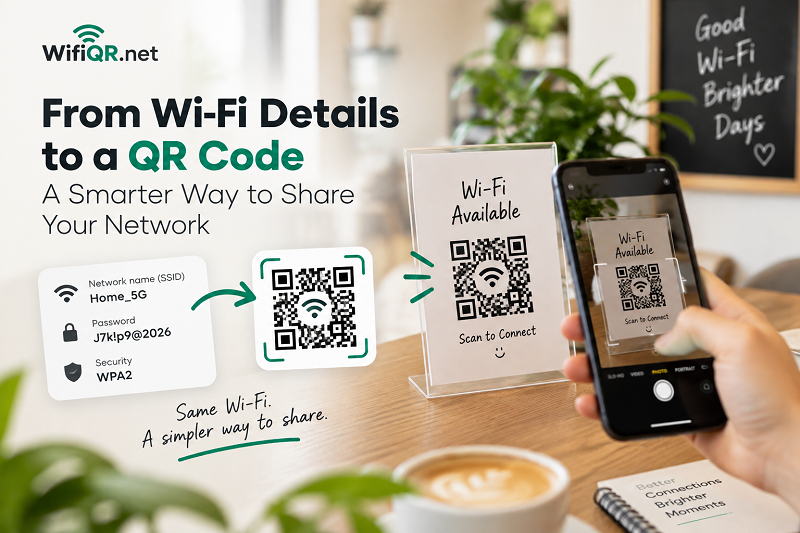
The Problem Isn't Your Wi-Fi. It's the Way You Share It.
Most Wi-Fi networks are perfectly fine. The frustrating part is getting other people connected without making them manually enter a password.
A network name might be easy enough to remember, but Wi-Fi passwords are often deliberately complicated for security reasons. That's good for the network, but not particularly friendly when five guests arrive and everyone needs internet access.
It gets even more awkward in places where Wi-Fi is shared frequently. A café may have dozens of customers asking for the password every day. An office may have visitors who need temporary access. A rental property might have new guests every few days. Even at home, you may find yourself repeating the same password to friends and family.
A Wi-Fi QR code turns that repetitive conversation into a quick scan.
What Happens When You Turn Wi-Fi Details Into a QR Code?
The basic idea is surprisingly simple.
Instead of asking someone to manually enter your Wi-Fi credentials, the connection information is encoded into a QR code. When a compatible phone scans it, the device can recognize the network details and offer the appropriate connection action.
The QR can contain information such as:
- The Wi-Fi network name, also known as the SSID
- The network's security type
- The Wi-Fi password
- Additional network information when applicable
The important part is that the QR is not merely a decorative shortcut. The Wi-Fi connection data is encoded into the QR itself.
That makes a static Wi-Fi QR particularly convenient when you simply want to share access without building a complicated system around it.
From a Password Nobody Wants to Type to a QR Anyone Can Scan
Imagine putting your Wi-Fi information on a small card next to the front door.
A guest walks in, sees the card, opens their camera, scans the QR code and follows the connection prompt. No spelling out the password. No asking whether that character was a zero or the letter O. No typing a 20-character password with one thumb while standing in the kitchen.
That's the real advantage.
The technology is almost invisible. And honestly, that's exactly how useful technology should feel.
If you're looking for a straightforward way to turn your network details into a scannable code, wi fi to qr code is a natural starting point.
Start With the Wi-Fi Information You Already Have
You don't need to change your router or install anything complicated.
Before creating the QR, gather the information already associated with your wireless network. In most cases, you'll need three key pieces:
- Network name: This is the SSID people see when they look for available Wi-Fi networks.
- Security type: The QR needs to know how the network is protected so the receiving device can interpret the connection information correctly.
- Password: This is the credential used to access the network.
If the network uses a hidden SSID or a particular security configuration, make sure those details are entered accurately as well.
Accuracy matters more than aesthetics at this stage. A beautifully designed QR containing the wrong password is still a useless QR.
Where a Wi-Fi QR Code Makes Life Easier
The obvious use case is your home, but that's only the beginning.
At Home
Put the QR somewhere guests can see it without having to ask you for access. A small printed card on a shelf, desk or entry table can be enough.
This is especially useful when your Wi-Fi password is long or difficult to communicate verbally.
In a Café or Restaurant
Customers don't necessarily want to stop at the counter and ask staff for a password. A clearly displayed QR near the entrance, counter or seating area can make the process more self-service.
It also reduces one tiny but surprisingly repetitive task for employees.
In an Office
Visitors, suppliers and temporary staff may need internet access without going through a lengthy setup process. A Wi-Fi QR can be included on a visitor information sheet or placed in a meeting room.
For businesses, using a dedicated guest network is usually preferable to exposing the credentials for an internal network.
In an Airbnb or Rental Property
This is one of those situations where a QR code feels almost tailor-made for the job.
Guests can find the network details in a welcome guide, on a small card or near the router. There's no need for the host to explain the same information to every new visitor.
At Events
Temporary Wi-Fi access can be surprisingly annoying when dozens of people need to connect around the same time. A visible QR gives attendees a quick way to get online without creating a queue around whoever happens to know the password.
Don't Just Create It. Test It.
This is the step people skip.
You create the QR, download it, print it and assume everything is fine. Then a guest scans it and nothing happens.
Before putting your QR code somewhere permanent, test it yourself.
Check that the network name is correct. Verify the password. Make sure the security type matches the router configuration. Then scan the finished QR with a phone and confirm that the device recognizes the network correctly.
If you're going to print the QR, test the printed version too.
A QR that works perfectly on a monitor can behave differently when printed extremely small, photographed at an angle or placed behind reflective plastic.
Think of the final QR as a physical interface, not just an image file.
Make the QR Easy to Scan, Not Just Easy to Look At
There is a temptation to customize every QR code.
Different colors. Fancy backgrounds. Logos. Decorative frames. Tiny text. Maybe even a gradient because it looks cool.
Customization can be useful, but QR codes have one job first: being scanned.
Keep enough contrast between the QR pattern and its background. Don't cover important parts of the code with graphics. Avoid overly complicated backgrounds. And give the QR enough breathing room around its edges.
If you're printing it, make the size appropriate for the distance from which people will scan it.
A beautiful QR that takes three attempts to scan is not a beautiful QR anymore.
A Small Sign Can Make the Whole Experience Better
You don't necessarily need a giant poster screaming "FREE WI-FI."
A simple card can work better:
Wi-Fi Available
Scan to Connect
Then place the QR underneath.
For a home, you could make it feel more personal. For a business, you might match the card to the brand's visual identity. For a rental property, the QR can become part of the welcome guide.
The QR handles the technical information. The surrounding design simply tells people what to do.
That's a useful distinction.
Think About Security Before Putting Your QR Everywhere
A Wi-Fi QR code is convenient, but convenience should not mean ignoring access control.
If the QR contains the credentials for your primary home or office network, anyone who can access the QR may potentially obtain the same connection information through a compatible device.
For frequent guest access, consider using a separate guest network. That gives visitors internet access without handing out the credentials for the network you use for personal devices, computers, printers or other connected equipment.
And if your Wi-Fi password changes, remember that any printed QR containing the old credentials will need to be replaced.
This is another reason to think about where you place the QR before printing dozens of copies.
One QR Can Replace a Lot of Repetition
The best part about a Wi-Fi QR code isn't really the QR itself.
It's everything you no longer have to do.
You don't have to spell out the password. You don't have to remember whether the third character is uppercase. You don't have to stand next to the router while someone types. You don't have to answer the same Wi-Fi question every time a new guest arrives.
Create it once, test it properly and put it where people need it.
For something as ordinary as connecting to Wi-Fi, that's a surprisingly nice upgrade.
Final Thought
Wi-Fi has become basic infrastructure in homes, offices, shops and hospitality spaces. The technology behind it can be complicated, but sharing access doesn't have to be.
If you already have the network name, security details and password, you're most of the way there. A QR code simply turns that information into something people can interact with in seconds.
Less typing. Fewer mistakes. Fewer "What's the password again?" moments.
Sometimes the smartest improvement isn't changing the technology. It's removing the unnecessary friction around it.