Why Customers Keep Asking for the Wi-Fi Password at Cafés
Customers asking for Wi-Fi shouldn't interrupt your café staff all day. Learn how better Wi-Fi access can create a smoother experience for both customers and your team.
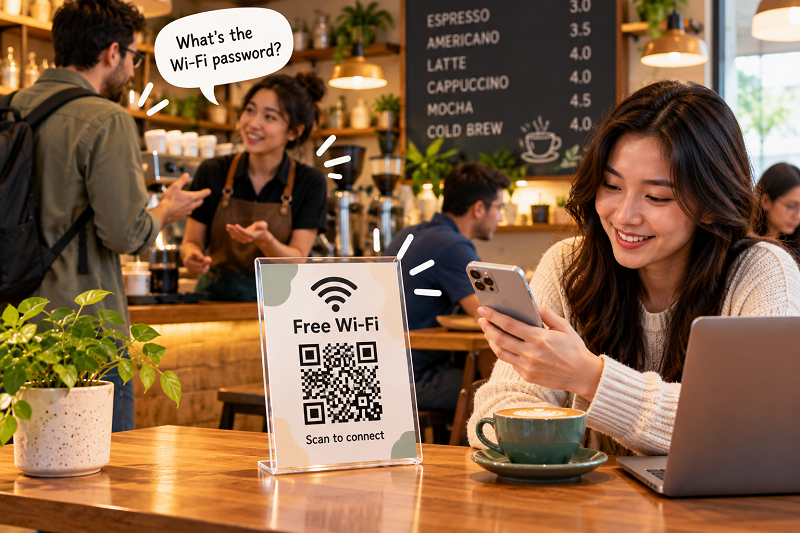
“What's the Wi-Fi password?”
- Your staff didn't sign up to be a Wi-Fi hotline
- The password itself may be making things harder
- Make the Wi-Fi visible before people have to ask
- QR codes work best when they disappear into the experience
- But don't sacrifice usability for a pretty sign
- One detail café owners often overlook
- Don't put the QR where nobody looks
- Give the Wi-Fi information a tiny bit of context
- The real win isn't fewer Wi-Fi questions
- A 60-second test before you call it done
If you run a café, you've probably heard that question so many times that you could answer it in your sleep. Someone walks in, orders a drink, finds a seat, opens a laptop—and five minutes later, a staff member is asked for the network name and password. Then another customer asks. Then another. Nobody is doing anything wrong. That's simply how café life works when internet access depends on a short conversation with an employee.
The interesting part is that the question looks tiny from the customer's perspective. For the business, however, repeated tiny interruptions can add up. The staff member has to stop what they're doing, remember the correct information, repeat it clearly, and sometimes troubleshoot when a customer mistypes something. Meanwhile, the customer is waiting to get connected instead of doing whatever brought them to the café in the first place.
Your staff didn't sign up to be a Wi-Fi hotline
A café team already has enough things competing for attention. Orders need to be prepared, tables need attention, payments need to be processed, and customers may have questions about the menu. Adding another recurring task—repeating a password that hasn't changed in months—doesn't seem like a big deal until it happens dozens of times a day.
There's also a human factor. Staff members naturally develop shortcuts. One might say the password quickly because they've repeated it hundreds of times. Another might point toward a sign. Someone else might write it down on a receipt. From the customer's side, all of these methods can feel slightly improvised.
The problem isn't that employees are unwilling to help. It's that the same piece of information shouldn't require an employee every single time.
A good café experience often comes down to removing small moments of friction. Customers shouldn't need to interrupt someone just to get online.
The password itself may be making things harder
Short passwords are easy to communicate but aren't necessarily the kind of credentials a business wants to use forever. Longer passwords can be better for security, but they are also harder to type manually.
Imagine trying to enter something like Cafe_Guest_48!Coffee while sitting at a small table with one hand holding your phone. Now imagine doing it while the person who gave you the password is waiting nearby. One wrong character and you're back to square one.
This is particularly annoying when the Wi-Fi is being used for work. Café customers may be opening a laptop for a meeting, uploading a large file, joining a video call, or trying to finish something before heading somewhere else. The last thing they need is a five-minute detour because they weren't sure whether the password contained a lowercase “l” or an uppercase “I”.
That's where the physical environment of a café becomes important.
Make the Wi-Fi visible before people have to ask
The simplest improvement isn't necessarily technological. Sometimes customers just need to know where the information is.
A small sign at the counter can work. So can a card on the table, a note beside the menu, or a clearly marked section of the café's welcome information. The exact location depends on the layout, but the principle is the same: make the answer available at the moment the question naturally appears.
This also changes the dynamic for employees. Instead of waiting for someone to ask, staff can simply point toward the Wi-Fi information when a customer mentions needing internet access.
That sounds like a minor difference, but it removes an entire conversational step.
And if the information can be accessed without manually typing a password, even better.
QR codes work best when they disappear into the experience
A Wi-Fi QR code doesn't need to become a giant promotional feature. In fact, making it too complicated can defeat the purpose.
The ideal experience is almost boring. A customer notices a small sign, opens their camera, scans the code, and their phone recognizes the Wi-Fi information. There is no password recital, no manual typing, and no need to ask an employee to spell something.
For cafés looking to set this up, a wifi qr maker can turn the network credentials into a scannable code that can then be printed and placed where customers naturally see it.
The useful part isn't the QR technology itself. It's the reduction in steps between sitting down and getting connected.
Think about it from the customer's perspective: they didn't come to your café because they were excited about entering a password. They came for coffee, conversation, work, food, or a place to spend some time. Wi-Fi access is part of the environment, not the main event.
The less attention it demands, the better.
But don't sacrifice usability for a pretty sign
There is a temptation to make every café QR code match the brand perfectly. A custom design can look great, but functionality has to come first.
A QR code covered in decorative elements, printed too small, placed behind glass with heavy reflections, or surrounded by a distracting background can become harder to scan. That's not exactly an improvement over typing a password.
Before putting a QR code on every table, test it in the actual environment. Scan it under the lighting customers will experience. Try it from a normal sitting position rather than holding the phone directly above it. Test different phones if possible.
The test doesn't need to be scientific. You're simply asking one question: can a normal customer walk up, scan this, and understand what to do without asking for help?
If the answer is yes, you're on the right track.
One detail café owners often overlook
There is something more important than the QR code itself: what network does it point to?
If your café has a dedicated guest network, use that rather than exposing credentials for an internal network used by staff or business equipment. Printers, POS systems, computers, smart devices, and other infrastructure shouldn't casually share the same access environment as customer phones just because it's convenient.
A guest network also gives you another practical advantage: you can change customer access without necessarily disrupting the devices your team relies on every day.
Of course, the exact options depend on your router and network configuration. A QR code doesn't replace sensible network security. It simply makes the intended guest connection easier to access.
Don't put the QR where nobody looks
Here's a surprisingly common mistake: creating a perfectly functional QR code and then putting it somewhere customers rarely notice.
A sticker hidden behind the register isn't useful if customers don't know it exists. A tiny card buried underneath a menu isn't much better. And a sign placed in a corner with poor lighting can turn a one-second scan into an awkward positioning exercise.
Look at your café from a customer's perspective.
Where do people naturally pause? Where do they sit? Where do they look while waiting for an order? Where do they put their phones? Those are better clues than simply choosing the most convenient location for staff.
A table card can be useful for seated customers. A counter sign can work for takeaway traffic. A small display near a laptop-friendly area can make sense in a café where people regularly stay for hours.
There isn't one perfect location. There is only the location your customers actually notice.
Give the Wi-Fi information a tiny bit of context
A QR code by itself can look mysterious. A short label makes the purpose obvious.
Something as simple as “Scan for Wi-Fi” is enough. You don't need a paragraph explaining QR technology. Customers already know what to do with a QR code.
The same principle applies to the network name. If your café has several networks, make sure the customer-facing information clearly identifies the intended one. Confusion is exactly what you're trying to eliminate.
And don't forget to update the physical material if the network credentials change. A QR code contains information; it isn't connected to your router in a way that lets it update itself automatically. If the password changes, the old printed code may no longer be useful.
The real win isn't fewer Wi-Fi questions
Reducing questions is nice, but that's not the most interesting benefit.
The bigger win is that customers can solve a small problem independently.
They don't need to flag down a staff member. Staff don't need to interrupt another task. Nobody has to repeat a complicated password. And the customer gets back to their laptop, phone, conversation, or coffee.
That is what good café design often looks like. It isn't necessarily about adding something flashy. It's about noticing the tiny points where people get stuck and removing them.
Wi-Fi happens to be one of those points because almost everyone understands the goal—get connected—but the traditional method can still be unnecessarily manual.
A 60-second test before you call it done
Before printing a hundred copies and placing them around the café, do one final reality check.
Scan the QR from the distance where customers will actually use it. Confirm that the correct network appears. Make sure the credentials are current. Test it with more than one phone if you can. Then ask someone who wasn't involved in setting it up to try connecting without instructions.
That last test is surprisingly valuable.
If they immediately understand what to do, you've built something useful. If they stare at the sign and ask, “What am I supposed to scan?”, the solution needs a little more context.
The best Wi-Fi setup is the one customers barely notice because it simply works.
And honestly, that's probably exactly what a café wants. Your staff should be thinking about coffee, customers, and service—not whether the Wi-Fi password has three numbers or four. Give people a clear way to connect, let their phones handle the tedious part, and keep the human interaction focused on things that actually need a human.