When Wi-Fi Gets Busy: Make Guest Connections Easier
Busy Wi-Fi doesn't have to mean endless password questions. Discover simple ways to make guest connections faster, clearer, and less frustrating.
There is a funny little problem with Wi-Fi: when everything works, nobody thinks about it. The moment five people walk through the door and start asking, “What’s the Wi-Fi password?”, it suddenly becomes everyone’s problem.
- The Real Problem Isn't Your Internet Connection
- Five Seconds of Friction Can Become a Lot of Friction
- Give People a Shortcut
- Make the Shortcut Impossible to Miss
- Don't Forget the People Who Can't Scan
- A Better Wi-Fi Experience Is Mostly About Removing Tiny Annoyances
A café employee has to stop what they’re doing. A host has to repeat the same password three times. Someone types an uppercase letter as lowercase. Another person enters a perfectly reasonable-looking password and somehow still ends up staring at “Unable to Join Network.” None of this is a major disaster, but it creates unnecessary friction.
And when the same thing happens dozens of times a day, those tiny interruptions start adding up.
The Real Problem Isn't Your Internet Connection
A fast internet connection doesn't automatically create a good Wi-Fi experience. There are really two separate things happening: the quality of the network itself and the process people go through to get connected.
You can have excellent coverage, plenty of bandwidth, and a reliable router while still making guests work too hard to get online. If the password is long, complicated, or difficult to read, the connection process becomes a miniature troubleshooting session.
This matters even more in places where people don't already know the network. Think cafés, small offices, rental properties, studios, waiting rooms, workshops, classrooms, or a living room full of weekend guests. The more unfamiliar users you have, the more valuable a simple connection process becomes.
Five Seconds of Friction Can Become a Lot of Friction
Imagine a small café with 40 customers during a busy afternoon. Even if only a portion of them need help connecting, employees can end up answering the same question over and over.
“What’s the network called?”
“Is that a zero or an O?”
“Can you repeat the password?”
“Why isn't it connecting?”
None of these questions are unreasonable. The customer isn't doing anything wrong. The system simply requires too much manual input.
That's the key distinction. The goal isn't to make people feel bad for asking. The goal is to remove the reason they need to ask in the first place.
Give People a Shortcut
This is where a visual connection option can make a surprisingly big difference. Instead of forcing every guest to manually enter a complicated password, you can give them a much simpler path from seeing the network information to actually joining it.
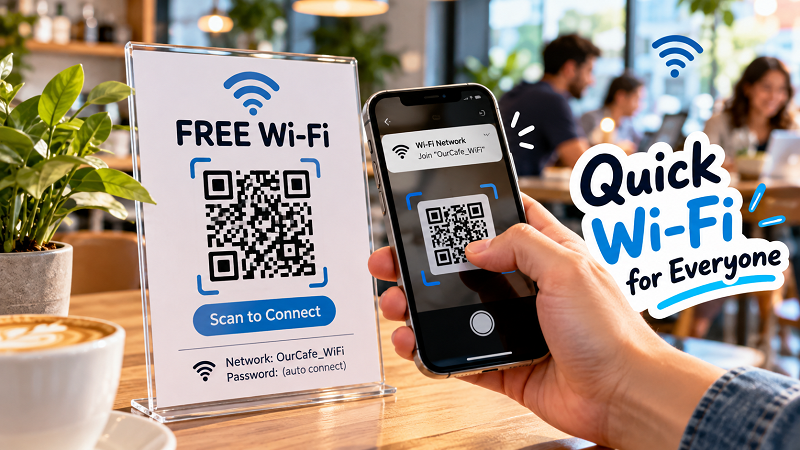
A qr code free wifi solution can turn that process into a quick scan, reducing the amount of typing required and making the network information easier to share. The QR code doesn't magically improve the underlying internet connection, of course. What it improves is the handoff between the person and the network.
That distinction is worth remembering. Good Wi-Fi isn't only about speed tests and signal strength. It's also about how little effort people need to spend getting online.
Make the Shortcut Impossible to Miss
A QR code only helps if people can actually find it.
This sounds obvious, but it's easy to hide useful information in plain sight. A tiny code stuck behind a counter isn't much help when ten customers are standing around with their phones. A poster covered in six different messages can make the Wi-Fi information surprisingly difficult to spot.
Think about where someone naturally looks when they need internet access. A small table sign, reception desk, check-in area, meeting room entrance, or countertop can work better than an obscure corner.
Keep the supporting information simple, too. The network name should be clearly visible. If there are separate networks for guests and staff, make the distinction obvious. A short instruction such as “Scan to connect” is usually more useful than a paragraph explaining what a QR code is.
The design doesn't need to win an award. It just needs to make the next action obvious.
Don't Forget the People Who Can't Scan
There is another small detail that can make the whole experience smoother: keep a manual option available.
Not every device handles Wi-Fi QR codes in exactly the same way, and some people may simply prefer entering network information themselves. That's fine. The QR code should be a shortcut, not a mandatory obstacle.
Displaying the Wi-Fi name alongside the code gives people a useful fallback. If necessary, you can also provide the password in a readable format. The objective is flexibility: give people a fast option without removing the traditional one.
This is especially useful in shared environments where guests may arrive with all kinds of phones, tablets, laptops, and other devices.
A Better Wi-Fi Experience Is Mostly About Removing Tiny Annoyances
Nobody walks into a café thinking, “I hope the Wi-Fi onboarding experience is excellent today.”
People just want to get connected and move on.
That's why the smallest improvements can have an outsized effect. A clearly presented network name, an easy-to-find connection method, and fewer opportunities for typing mistakes can make the entire process feel almost invisible. And invisible is exactly what you want from something like this.
The best connection experience is the one people barely notice because it simply works.
So if your Wi-Fi is regularly being shared with guests, customers, visitors, or event attendees, don't only ask whether the internet is fast enough. Ask a more practical question: how much effort does someone need to spend before they can actually use it?
If the answer involves repeated questions, awkward password transcription, or employees becoming human Wi-Fi manuals, there is probably room to simplify the experience.
And sometimes, making Wi-Fi easier isn't about buying a better router at all. It's about removing one unnecessary step.
Prev post: Get WiFi QR Code: How to Find or Create One Fast