Stop Sending Your Wi-Fi Password in Group Chats
Still sending Wi-Fi passwords through group chats? Learn how a Wi-Fi QR code makes repeated network sharing faster, simpler, and less frustrating.
There’s a surprisingly annoying ritual that happens in almost every home, office, rental property, and shared space: someone asks for the Wi-Fi password, somebody types it into a group chat, everyone moves on, and then the exact same question comes back a few days later. “What’s the Wi-Fi again?” So you search the conversation, scroll past memes and random messages, find the password, copy it, and send it again. If you're lucky, it still works. If you're not, the password changed last week and now you're back at square one. None of this is a major problem on its own, but repeat it often enough and it becomes one of those tiny annoyances that makes everyday life feel unnecessarily complicated.
- Group Chats Make Terrible Wi-Fi Directories
- The Problem Gets Bigger as More People Need Access
- The Password Isn't the Problem. The Handoff Is.
- Think of It as a Wi-Fi Shortcut
- A Screenshot Doesn't Really Solve the Problem
- Repeated Sharing Is Where QR Codes Really Shine
- Convenience Doesn't Mean You Should Ignore Security
- Don't Forget What Happens When the Password Changes
- Stop Making People Ask for the Password
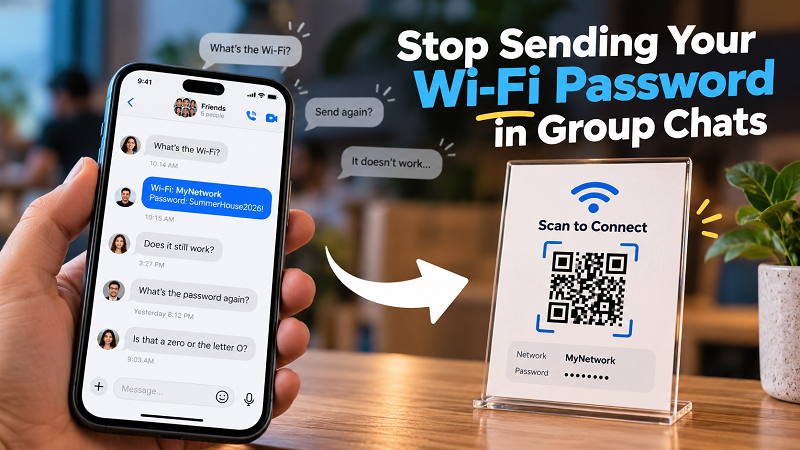
Group Chats Make Terrible Wi-Fi Directories
Messaging apps are built for conversations, not for storing information that people need to retrieve over and over again. A Wi-Fi password dropped into a busy group chat might be easy to find right after it is posted, but its usefulness decreases rapidly as new messages pile up. A week later, someone may have to search through hundreds of messages just to find a short string of letters, numbers, and symbols. Someone who joined the conversation later may not even know the password was ever shared.
Typing the password again isn't much better. Long passwords are particularly annoying because one incorrect character can prevent a connection. A lowercase letter becomes uppercase, a zero looks like an “O,” or a special character gets missed entirely. Then comes the inevitable message: “It doesn't work.” The funny thing is that nobody is really doing anything wrong. The problem is simply that a password was never designed to be a particularly friendly thing to pass from one person to another.
The Problem Gets Bigger as More People Need Access
Sharing Wi-Fi with one person once isn't a big deal. The situation changes when the same network is used by a family, a group of friends, office visitors, short-term renters, customers, or anyone else who needs access regularly. Suddenly, the password becomes a piece of information that has to be manually delivered again and again. Someone asks, someone answers, someone types, someone makes a mistake, and the whole process repeats.
This is where convenience starts to matter. You don't necessarily need a new password or a more complicated network setup. You need a better way to hand the existing information to another device. When the same credentials are being shared repeatedly, reducing the number of steps involved can make a surprisingly noticeable difference.
The Password Isn't the Problem. The Handoff Is.
A useful way to think about this is to separate the Wi-Fi credential from the way it gets delivered. Your password is still the password. The network still works exactly the same way. What changes is the handoff. Instead of asking another person to manually read and type a string of characters, you can give them a visual shortcut that their phone can scan.
That's where a wifi password to qr code approach becomes useful. The QR code doesn't replace your Wi-Fi network or magically improve the connection. It simply packages the necessary connection information into a format that can be accessed with a quick scan. In other words, the destination stays the same; you are just making the route easier.
Think of It as a Wi-Fi Shortcut
This is why a QR code can be more practical than another password message. Imagine having a guest arrive at your home. Instead of stopping the conversation to spell out the network name and password, you can point them toward a QR code. At a rental property, the same code can sit inside a welcome guide. In an office, it can be available for visitors who need temporary internet access. In a café or another customer-facing space, it can reduce the number of times employees have to answer the same question.
The real benefit isn't that QR codes are somehow futuristic. It's that they remove unnecessary steps. A person doesn't have to remember what you said, search through an old conversation, carefully type a complicated password, or ask you to repeat it. The connection process becomes much closer to a simple “scan and go” experience.
A Screenshot Doesn't Really Solve the Problem
Some people already have a workaround: take a screenshot of the Wi-Fi password and keep it on the phone. That's certainly better than relying on memory, but it introduces a different problem. Now you have to remember where the screenshot is. Was it taken six months ago? Did you save it in a dedicated album? Did you send it to someone instead? Is the screenshot showing the current password or an old one?
A dedicated Wi-Fi QR code gives the information a clearer purpose. Instead of having a random screenshot containing credentials somewhere in your photo library, you have a specific visual shortcut designed for connecting to the network. It can be shared digitally, saved for later, or printed for people who visit the same place regularly. The difference sounds small, but small improvements become valuable when the same action happens dozens or hundreds of times.
Repeated Sharing Is Where QR Codes Really Shine
The best reason to use a Wi-Fi QR code isn't that everyone needs one. It's that repeated sharing eventually becomes tedious. If you rarely have visitors, manually sharing a password probably isn't worth thinking about. But if friends and family visit often, a QR code can eliminate the same conversation every weekend. If you manage a rental property, it can become part of the arrival experience. If you run an office, it can make guest access less dependent on whoever happens to be sitting at reception.
Notice the common thread: it's not really about the type of place. It's about how frequently the information needs to be shared. A password that is shared once doesn't create much friction. A password shared fifty times absolutely does. The more often people need access, the more useful it becomes to turn that access information into something reusable.
Convenience Doesn't Mean You Should Ignore Security
There is one thing worth remembering before putting a Wi-Fi QR code somewhere permanent: convenience and security still need to work together. A QR code containing Wi-Fi credentials can make access easier, which also means anyone who can access the code may be able to connect. For public or semi-public situations, a guest network is often a sensible option because visitors don't necessarily need access to the same network used by your personal devices.
Think about where the QR code will be displayed and who can scan it. A small card inside your home is different from a QR code displayed at the entrance of a business. The goal isn't to make Wi-Fi difficult to access. It's to make the right network easy for the right people to use.
Don't Forget What Happens When the Password Changes
There's also one maintenance rule that is easy to overlook. If you change the Wi-Fi password, any QR code containing the old credentials will still contain the old credentials. It won't update itself just because the router has a new password. If you print a QR code and leave it on a wall, desk, counter, or welcome card, remember to replace it whenever the network information changes.
This matters even more in places where people rely on the QR code without asking questions. An outdated printed code can quietly become a source of frustration because visitors may assume their phone or the network is the problem. Keeping the displayed information current is a small task, but it prevents a surprisingly annoying situation.
Stop Making People Ask for the Password
The best Wi-Fi experience is often the one nobody has to think about. You shouldn't need to interrupt a conversation to spell out a password. A guest shouldn't have to search through an old message. A customer shouldn't have to wait for an employee to finish helping someone else just to get online. And nobody should have to ask, “Is that a zero or the letter O?”
A Wi-Fi password will always be part of the network. That's fine. The smarter move is simply to make the password easier to hand off when people need it. Instead of treating every new connection as another request that needs a reply, you can turn access into something people can handle themselves. Less typing, less searching, fewer repeated questions—and a much smoother path from “What's the Wi-Fi?” to actually being online.