Can You Track Wi-Fi QR Code Scans? Business Guide
Can you track Wi-Fi QR code scans? Learn what scan counts reveal, how Wi-Fi analytics work, and how businesses can measure guest connectivity.
You put a Wi-Fi QR code on every table, print a polished sign for the counter, and make connecting look ridiculously easy. Then someone walks up and asks, “What's the Wi-Fi password?” Again. So, is anyone actually scanning that code, and is it helping your business? That's where things get interesting. A Wi-Fi QR code can make guest access much more convenient, but measuring its performance isn't as simple as counting how many people walk through the door. To understand whether your setup works, you need to separate QR scans, connection attempts, and successful Wi-Fi access. Those numbers tell very different stories.
- The Numbers Behind a Wi-Fi QR Code
- What a Standard Wi-Fi QR Code Can Actually Tell You
- Where Scan Analytics End and Wi-Fi Analytics Begin
- Why More Scans Don't Always Mean Better Wi-Fi Access
- Measure the Experience Without Collecting More Data Than You Need
- Choose the Right Measurement for Your Goal
- The Bottom Line: Measure What Matters
The Numbers Behind a Wi-Fi QR Code
Imagine running a busy coffee shop. You want customers to connect quickly, spend time in your store, and stop asking your staff to repeat a password that sounds like a cat walked across the keyboard. Naturally, you'd love a dashboard showing how many guests used your Wi-Fi QR code. But before looking for that dashboard, it's worth understanding what you're trying to measure.
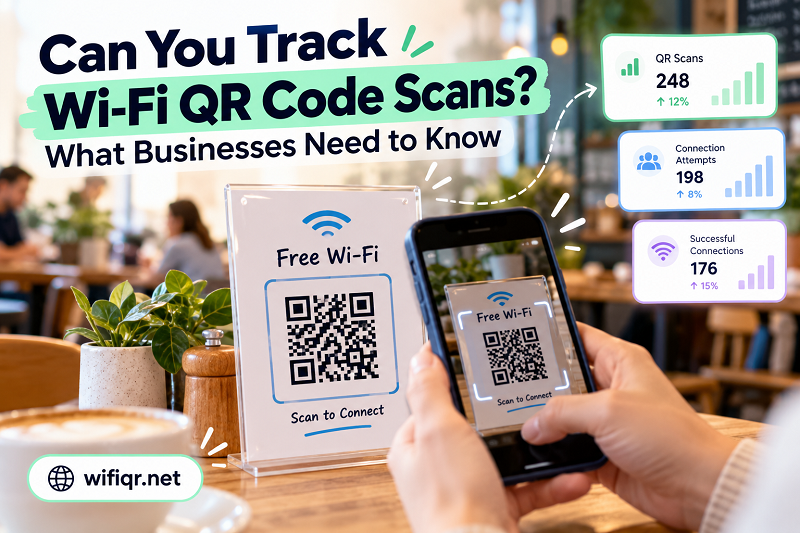
There are three distinct events to consider:
- QR code scans: Someone points a phone camera at the code and scans it. Whether that event can be counted depends on how the QR code and the scanning process are implemented.
- Connection attempts: A device tries to join the wireless network after the user scans the code or otherwise enters the network details.
- Successful connections: A device joins the network. Depending on the system, this may still be different from successfully reaching the internet.
These events aren't interchangeable. One person might scan a code several times without connecting. Another might scan it once and connect immediately. Someone else might already know the password and never scan the code at all. A useful measurement system recognizes those differences instead of treating every interaction as proof of a successful connection.
What a Standard Wi-Fi QR Code Can Actually Tell You
A conventional static Wi-Fi QR code stores network information in a format that compatible devices can interpret. Depending on how it was created, that information typically includes the network name (SSID), security type, and password. When a guest scans the code with a compatible device, the phone may offer to join the network without requiring the guest to type those details manually.
Here's the catch: the code itself doesn't automatically report who scanned it, how many times it was scanned, or whether the person successfully connected. With a static QR code, the encoded information is simply there for a compatible device to read. There doesn't have to be an analytics service, tracking script, or online redirect involved.
That distinction matters when choosing a tool. If your main goal is convenient access rather than visitor analytics, you can make qr code for wifi and display the resulting code wherever guests need it. A straightforward static code can do its job without introducing a separate tracking layer or requiring you to maintain a visitor database.
Of course, the absence of built-in scan analytics doesn't mean you have no way to evaluate your setup. It simply means you need the right measurement method for the question you're asking.
Where Scan Analytics End and Wi-Fi Analytics Begin
QR analytics and network analytics solve different problems. Mixing them up is a reliable way to end up with impressive-looking numbers that don't actually answer your business question.
QR scan analytics measure interactions with a code. A QR tracking platform may count scans, record timestamps, or report other interaction data, depending on its features and configuration. However, a static Wi-Fi QR code that directly encodes network credentials doesn't automatically provide these reports. Tracking typically requires an additional mechanism, such as a managed redirect or a compatible analytics solution. Even then, a recorded scan doesn't necessarily identify a unique person or confirm a successful Wi-Fi connection.
Wi-Fi analytics measure activity on the network. A router, wireless controller, or managed guest Wi-Fi platform may report connected devices, connection events, session durations, and other operational information. The exact data available depends on the equipment, software, configuration, and privacy settings. A device that connects successfully may never have scanned your QR code, so network records alone usually can't establish that the QR code caused the connection.
Internet analytics measure a different layer again. A device can join a Wi-Fi network but fail to access the internet because of a captive portal, a network restriction, an outage, or another issue. Network connection status and successful internet access are related, but they aren't identical.
The takeaway is simple: choose a measurement method based on the outcome you want to understand. Scan data can help evaluate engagement with a code. Network records can help evaluate connectivity. Neither should be presented as a complete picture of the guest experience on its own.
Why More Scans Don't Always Mean Better Wi-Fi Access
Let's say a restaurant introduces QR codes at 20 tables. During the first week, its tracking platform reports 300 scans. The manager celebrates because the new signs appear to be getting attention. Then the staff report that customers are still asking for the password, and a few guests complain that their phones won't connect.
Those 300 scans are real interactions if the tracking system has measured them correctly, but they don't tell the entire story. Some guests might have scanned the same code multiple times. Others might have opened the scan result without completing the connection process. A device might have rejected the network settings, or the guest might have been using a phone that handles Wi-Fi QR codes differently.
There could also be a much simpler explanation: the signs are attracting attention, but the instructions aren't clear enough. Guests may not realize they need to tap a confirmation prompt after scanning. A sign placed behind a counter might be difficult to reach, while a code printed too small could be frustrating to scan from a seated position.
This is why scan volume should be treated as a clue rather than a verdict. A high number of scans can suggest that people are interacting with your signs, but it cannot prove that the connection process is smooth. Likewise, a low scan count might reflect poor sign placement, low foot traffic, or guests who already know how to connect—not necessarily a bad QR code.
To understand the real outcome, combine whatever reliable technical data you have with observations from the people using the network. When guests repeatedly need staff assistance, investigate the experience instead of simply printing more QR codes.
Measure the Experience Without Collecting More Data Than You Need
Not every café, hotel, or retail store needs an analytics platform. In many cases, a few practical observations can reveal whether the current setup is working.
Start by checking how often staff are asked for the Wi-Fi password. You don't need to record customer identities; a simple count of recurring requests during comparable periods can provide a useful baseline. If those requests fall after you improve the signs, that's evidence that the new arrangement may be helping.
Next, examine the physical experience. Can customers see the code from where they sit? Is it large enough to scan? Does the sign explain what happens next? Are the network name and connection instructions consistent with the actual Wi-Fi configuration? These details can have a bigger impact than a sophisticated dashboard.
If you need more precise measurements, identify the gap in your existing information before buying a tool. A QR analytics platform may help measure scans, while a managed Wi-Fi system may provide connection statistics. Before implementing either, check what the product actually records, whether it can distinguish repeat interactions, how it handles device identifiers, and whether the reporting meets your privacy obligations.
Avoid collecting personal data just because a platform makes it available. For a small business, knowing that guests frequently need connection assistance may be enough to justify a better sign or clearer instructions. Tracking individual visitors is rarely necessary for that basic improvement.
Choose the Right Measurement for Your Goal
The best metric depends on what you want to improve. If you're evaluating whether guests notice your Wi-Fi QR code, scan data may be relevant. If you're trying to understand whether devices join the network successfully, use appropriate network-side information. If customers connect but can't browse the web, investigate internet access and any guest-network restrictions.
You should also establish a baseline before making changes. Record the relevant observations over a representative period, change one major factor at a time when practical, and compare the results under similar conditions. For example, moving a sign closer to the center of a table may be worth testing before replacing the entire QR system. Keep in mind that changes in foot traffic, customer behavior, and network conditions can affect the results.
Most importantly, be honest about what your numbers mean. A scan isn't a customer, a connected device isn't necessarily a unique person, and a successful Wi-Fi connection doesn't automatically prove that the guest had a good experience. Clear definitions make your reports more useful and prevent you from spending money to solve the wrong problem.
The Bottom Line: Measure What Matters
A Wi-Fi QR code is primarily a shortcut to easier network access, not an analytics dashboard disguised as a square. A standard static code can provide a fast, convenient way for guests to connect, but it doesn't automatically track scans or confirm successful connections. Additional QR analytics and Wi-Fi management tools can provide more information when you genuinely need it.
For most small businesses, the smartest approach is to start with the problem customers actually experience. If guests struggle to find the password, improve visibility and instructions. If you need to know whether devices are connecting, look at the appropriate network data. And if scan performance is your priority, choose a QR tracking solution that explicitly supports that function.
Don't chase the biggest number on a dashboard. Find the measurement that answers your question, respect your customers' privacy, and use the results to make connecting easier. That's the kind of Wi-Fi experience people notice—and the kind that saves your staff from becoming a human password dispenser.