Can You Send a Wi-Fi QR Code to Someone Remotely?
Can you send a Wi-Fi QR code to someone far away? Learn how remote Wi-Fi QR sharing works, how to scan it from another screen, and what to know about security.
What if someone asks for your Wi-Fi password while you're nowhere near home? Maybe a friend has just arrived at your house, a family member needs to connect a new phone, or you're helping someone troubleshoot their connection from miles away. Reading out a complicated password over a phone call is awkward, and typing a long string of characters into a chat is even less fun. If you already have a Wi-Fi QR code, there's a much simpler option: send the QR code as an image.
- Yes, You Can Send a Wi-Fi QR Code Remotely
- A Wi-Fi QR Code Is Basically a Portable Version of Your Network Details
- The Two-Phone Method Is the Easiest Example
- What If They Only Have One Phone?
- Does the Other Person Need to Be Near Your Router?
- Sending the QR Doesn't Automatically Give Someone Internet Access
- But Is It Safe to Send Your Wi-Fi QR Code?
- A Guest Network Makes Remote Sharing Safer
- When Sending a Wi-Fi QR Code Makes Perfect Sense
- When You Should Think Twice
- The Simple Rule to Remember
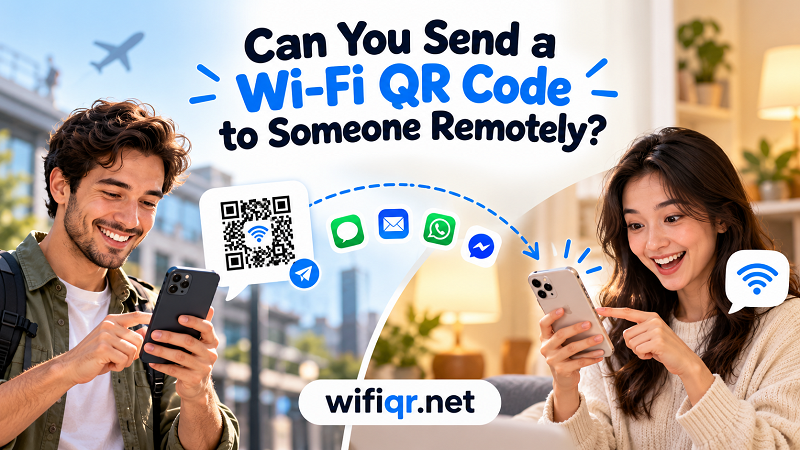
Yes, You Can Send a Wi-Fi QR Code Remotely
A Wi-Fi QR code doesn't need to be physically next to the router to be useful. Once the network information has been encoded into the QR code, the code itself can be shared as an image. You can send that image through a text message, email, Messenger, WhatsApp, AirDrop, cloud storage, or pretty much any other service that lets you send pictures.
The important distinction is that you're sending the information needed to connect, not remotely connecting the other person's device for them. Their phone still needs to read the QR code and then attempt to join the Wi-Fi network.
Think of it like sending someone a digital key. You don't have to be standing next to the door when you hand over the key. The key can travel independently; what matters is whether the person receiving it can use it.
A Wi-Fi QR Code Is Basically a Portable Version of Your Network Details
A QR code may look like a random collection of black and white squares, but those squares represent encoded data. For a Wi-Fi QR code, that data can include the network name, security type, and password.
That's why using a wifi password as qr code can be so convenient. Instead of asking someone to manually type a complicated password, you give them an image that a compatible phone can interpret.
And because the information is contained in the QR itself, the recipient doesn't need to contact your router just to read it. The QR image can be sitting on a phone, laptop, tablet, printed card, or another screen.
The Two-Phone Method Is the Easiest Example
Here's a simple scenario. Your friend is visiting your home, but you're still at work. You have a screenshot of your Wi-Fi QR code saved on your phone. You send the image to your friend.
Your friend opens the image on another device, such as a laptop or tablet, while using their phone to scan it. The phone reads the QR information, recognizes the Wi-Fi network details, and can offer to connect to the network.
Nothing magical happened in the background. You didn't remotely control their phone. Your router didn't send them anything. You simply moved a piece of encoded information from one screen to another.
This is one of the coolest practical advantages of QR codes: the code can travel even when the person who created it isn't there.
What If They Only Have One Phone?
This is where things get slightly more interesting.
Suppose you send someone a Wi-Fi QR code and they have only one smartphone. They open the QR image on that phone. Now they have the code displayed on the same camera they would normally use to scan it.
That's not as straightforward as scanning a QR printed on paper or displayed on another screen. However, depending on the phone and operating system, the person may be able to use built-in image or QR recognition features to read the code directly from a saved picture.
If that isn't available, the easiest workaround is to display the QR code on another screen. A laptop, tablet, monitor, or even another phone can become the temporary “surface” for the QR code.
So the limitation isn't really distance. It's whether the receiving device has a practical way to read the QR image.
Does the Other Person Need to Be Near Your Router?
No.
This is an important distinction. The QR code doesn't have to be within Wi-Fi range simply because it contains Wi-Fi information.
You could create the QR code at home, send it to someone across town, and they could open it later when they're physically near the network. The QR itself can travel anywhere through the Internet or through a simple file transfer.
What matters is what happens next. When the recipient actually tries to connect, their device needs to be within range of the Wi-Fi network. The QR can be thousands of miles away from the router when you send it, but the phone obviously can't connect to a router it can't physically reach.
In other words:
QR code distance and Wi-Fi signal distance are two completely different things.
Sending the QR Doesn't Automatically Give Someone Internet Access
There's another small but important distinction. A QR code can provide the credentials needed to join a Wi-Fi network, but it can't guarantee that the network itself has working Internet access.
Imagine your router is turned on but your ISP connection is temporarily down. Someone might successfully use the QR code, connect to the Wi-Fi network, and still be unable to browse the web.
The QR handles the connection information. It doesn't repair the Internet connection, activate your ISP service, or magically make a weak signal stronger.
That's why a successful QR scan and a working Internet connection shouldn't be treated as exactly the same thing.
But Is It Safe to Send Your Wi-Fi QR Code?
Here's the part worth paying attention to.
A Wi-Fi QR code is convenient, but convenience shouldn't be confused with security. If the QR contains the credentials for your private network, anyone who obtains the QR may potentially be able to use those credentials to connect.
In practical terms, treat your Wi-Fi QR code much like you would treat the password itself.
Sending it privately to a family member? Probably reasonable.
Posting the QR for your private home network publicly on social media? Probably not your finest security decision.
Sharing it with a large group of people you don't know? Also questionable.
The QR doesn't create individual permissions for every person who scans it. It simply makes the underlying network information easier to transfer.
A Guest Network Makes Remote Sharing Safer
If you're regularly giving Wi-Fi access to people outside your household, a guest network is worth considering.
Instead of turning your primary home network into a community resource, you can provide guests with separate credentials. If those credentials are later shared more widely than expected, your main network remains isolated from that guest access.
This becomes especially useful for vacation rentals, small offices, family gatherings, or situations where several people need temporary connectivity.
The basic rule is simple: share the least privileged network that gets the job done.
If someone only needs Internet access for their phone, there's usually little reason to hand them access to the same network used by your computers, printers, smart-home devices, and other personal equipment.
When Sending a Wi-Fi QR Code Makes Perfect Sense
Remote QR sharing is particularly handy when the person giving access isn't physically present. A family member setting up a new phone can receive the QR before visiting. A friend arriving at your home can have the information ready before they walk through the door. A property owner can send guest network details before a visitor arrives. Even remote technical support becomes easier when you can send a visual representation of the network credentials instead of dictating a long password character by character.
The common thread is convenience: the QR lets the information move independently of the person who created it.
When You Should Think Twice
The convenience also creates a responsibility. If your Wi-Fi QR code contains credentials for an important private network, don't treat the image as harmless artwork.
Avoid leaving it somewhere publicly accessible. Don't casually forward it to huge groups. And if you believe the QR has been shared with people who shouldn't have access, changing the Wi-Fi password may be appropriate.
Remember, creating a new QR code doesn't revoke the old credentials. If the underlying password hasn't changed, an old screenshot can still represent the same access.
That's an easy detail to overlook.
The Simple Rule to Remember
Yes, you can send a Wi-Fi QR code to someone remotely. The image can travel through a message, email, cloud service, or another device, and the recipient can read it when they have a suitable way to scan or interpret the code.
Just remember the difference between sharing the code and connecting to the network. The QR can travel anywhere. The actual Wi-Fi connection still happens where the network exists.
And because the QR may contain your network credentials, treat it with the same basic care you'd give the password itself.
A Wi-Fi QR code makes sharing dramatically easier. It doesn't magically make access public, temporary, or risk-free. It's simply a smarter way to package and pass along information that would otherwise be annoying to type.