Can Someone Replace Your Wi-Fi QR Code With a Fake One?
Fake Wi-Fi QR Codes can expose customers to untrusted networks. Discover how QR sticker scams work and how businesses can protect their Wi-Fi access points.
Imagine walking into your favorite coffee shop, ordering a drink, and spotting a Wi-Fi QR Code right on the table. You pull out your phone, scan it, and connect in seconds. No awkward password questions, no typing long combinations of random characters. Convenient, right?
- The QR Code on Your Table May Not Be the One the Business Created
- How a Fake QR Sticker Replaces a Legitimate Code
- Why People Rarely Question a QR Code in a Familiar Place
- Not Every Fake Wi-Fi QR Code Attack Works the Same Way
- The Trust Gap Between a QR Code and the Network Behind It
- What Happens When Customers Lose Trust in Your Wi-Fi QR Code?
- Building a QR Code That Customers Can Actually Trust
- Layer 1 – Physical Authenticity
- Layer 2 – Digital Verification
- Layer 3 – Operational Control
- A QR Code Is Only as Trustworthy as the Process Behind It
But here's something most people never think about: What if that QR Code isn't the one the coffee shop originally placed there?
A small sticker can change everything. Someone could print a replacement QR Code, stick it over the original, and quietly turn a helpful Wi-Fi shortcut into a potential security risk. The sign still looks familiar. The table hasn't changed. Even the QR Code might look perfectly legitimate. Yet the information encoded inside could be completely different.
This is one reason businesses should think beyond simply putting a QR Code on a table. Convenience matters, but trust matters just as much.
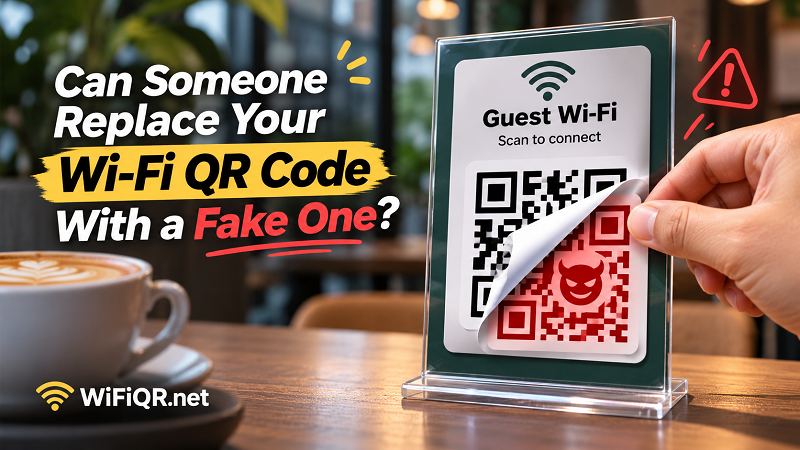
The QR Code on Your Table May Not Be the One the Business Created
QR Codes are designed to make information accessible with a quick scan. Unfortunately, that simplicity also creates an opportunity for physical tampering. Unlike a digital login page that customers can inspect before interacting with it, a printed QR Code offers very little visual information about what it actually contains.
How a Fake QR Sticker Replaces a Legitimate Code
The concept is surprisingly simple. A malicious person creates a new QR Code and prints it onto a sticker. They then place that sticker over an existing code in a public location, such as a restaurant table, hotel lobby, coworking space, or waiting area.
Someone arriving later sees what appears to be the business's official Wi-Fi sign and scans it without suspecting anything unusual.
The replacement doesn't need sophisticated technology. It exploits something much more ordinary: people's habit of trusting information displayed in a familiar environment.
And because QR Codes are visually complex patterns of black and white squares, most people cannot tell whether a printed code has been replaced simply by looking at it.
Why People Rarely Question a QR Code in a Familiar Place
Context creates trust. A QR Code sitting beside a restaurant menu feels legitimate because customers naturally assume the restaurant placed it there. A Wi-Fi sign in a hotel reception area receives the same benefit of the doubt.
This is a form of environmental trust. People often judge an object by where they find it rather than verifying who created it.
Attackers can take advantage of that behavior. A familiar logo, a professional-looking sign, or a well-designed table display may make a replacement code appear authentic. None of these visual elements independently proves that the QR Code is safe.
The uncomfortable truth? A convincing presentation is not the same thing as a trustworthy source.
Not Every Fake Wi-Fi QR Code Attack Works the Same Way
Before treating every suspicious QR Code as the same threat, it's important to understand the differences. A Wi-Fi QR Code, a website QR Code, and a malicious redirect are not interchangeable.
| Attack Type | What Happens | Potential Risk |
|---|---|---|
| Fake Website QR | The code opens a fraudulent website designed to imitate a legitimate service. | Phishing and credential theft |
| Fake Wi-Fi QR | The code contains connection details for an unauthorized wireless network. | Connecting to an untrusted network |
| Replaced QR Sticker | A malicious sticker covers the original business QR Code. | Customers receive information they didn't expect |
| Malicious Redirect | The code directs users through an unexpected or deceptive destination. | Exposure to fraudulent websites or unwanted tracking |
A particularly important distinction concerns Wi-Fi QR Codes. A standard Wi-Fi QR Code generally encodes network information such as the SSID, password, and encryption type. Scanning one does not automatically open a website or install malicious software.
However, a replacement code could contain credentials for a different network. If the network is controlled by an attacker, users may unknowingly connect to an untrusted access point.
The risk depends on what the QR Code contains, what the phone does with that information, and how the destination network is configured. Understanding these differences helps businesses respond to actual threats instead of treating every QR-related incident as identical.
The Trust Gap Between a QR Code and the Network Behind It
Here's where things get interesting. Even if a QR Code successfully connects someone to Wi-Fi, that doesn't necessarily mean the connection is legitimate.
A wireless network's name, commonly called its SSID, is not a reliable identity check. Someone can create a network with a name that looks almost identical to the one used by a nearby business.
For example, imagine a café named Central Coffee with an official network called CentralCoffee_Guest. An unauthorized network might use a slightly modified name that customers could easily overlook.
A customer scans a replacement QR Code, joins the wrong network, and assumes everything is working normally.
There are several reasons this situation can be difficult to detect:
- Familiar network names: People often recognize a Wi-Fi name rather than verify its authenticity.
- Automatic connections: Devices may reconnect to previously saved networks without requiring users to inspect every detail.
- Limited visibility: Most customers don't know how to check whether a wireless access point belongs to the business.
- False confidence: Seeing the Wi-Fi icon appear on a phone doesn't prove that the network is trustworthy.
This is why businesses should treat their guest Wi-Fi infrastructure as part of their customer experience and security responsibilities. A QR Code is simply the entry point. The network behind it still needs proper configuration, access controls, and monitoring.
What Happens When Customers Lose Trust in Your Wi-Fi QR Code?
For a business, a fake QR Code isn't just a technical inconvenience. It can become a customer experience problem.
Think about the situation from the customer's perspective. They visit a restaurant, scan the Wi-Fi sign, and encounter an unexpected website or an unfamiliar network. Even if they avoid any direct harm, they may start questioning whether the business takes security seriously.
That hesitation can affect more than one connection.
Customer confidence takes a hit. People increasingly expect digital interactions to be quick and straightforward. When something feels suspicious, they become reluctant to scan other codes displayed by the business.
Employees face unnecessary interruptions. Staff may have to answer questions, troubleshoot connection problems, or explain why the Wi-Fi information on a table no longer works.
Brand reputation becomes part of the problem. Customers may associate the suspicious experience with the business itself, even when the incident was caused by an outside individual.
Operational costs can increase. Replacing printed materials, investigating incidents, checking network configurations, and communicating with customers all require time and resources.
The bigger lesson is that a small printed object can carry a surprisingly large responsibility. Businesses that use QR Codes should consider their physical protection and ongoing maintenance just as seriously as their initial design.
Building a QR Code That Customers Can Actually Trust
Security doesn't have to make the customer experience complicated. In fact, the best approach is to build protection into the process before a QR Code ever reaches a table or reception desk.
Think of it as three connected layers.
Layer 1 – Physical Authenticity
Start with the physical object customers interact with. A loose piece of paper or a small sticker can be relatively easy to replace without attracting attention.
Businesses can reduce this risk by using durable printed displays, placing QR Codes in visible areas, and incorporating recognizable brand elements into their signage.
For example, a restaurant might use a professionally printed table card featuring its logo, Wi-Fi instructions, and a clearly identifiable design. If someone places an unfamiliar sticker over the original, the difference may become easier for customers or employees to notice.
Regular physical inspections are equally important. Check table displays, reception signs, wall-mounted instructions, and other locations where visitors commonly scan codes.
Layer 2 – Digital Verification
The next step is making sure the QR Code contains the correct information.
Before printing, businesses should verify the encoded Wi-Fi details, including the network name, password, and security type. After printing, scan the final physical version using a test device and confirm that it behaves as expected.
A reliable wifi qr code creator can simplify this process by generating a scannable code from the correct network information without requiring customers to manually enter complicated passwords.
The important part is not simply generating a code. It's establishing a verification routine so the printed result matches the intended network configuration.
Businesses should also avoid assuming that a QR Code is permanently correct. If the Wi-Fi password changes, the network is replaced, or the security configuration is updated, the displayed code may need to be regenerated and reprinted.
Layer 3 – Operational Control
Even a well-designed QR Code can become a problem if nobody is responsible for maintaining it.
Assign someone to oversee guest Wi-Fi signage and establish a straightforward inspection process. This doesn't need to be complicated or time-consuming.
A practical approach includes checking displayed codes during routine opening procedures, confirming that the network name matches the official guest network, and removing any unfamiliar stickers or unauthorized replacements.
Businesses should also have a clear response plan. If a suspicious QR Code is discovered, remove the affected display, verify the legitimate network details, and investigate whether the wireless configuration has been compromised.
If there is evidence that unauthorized users have accessed the network, review access controls and consider changing guest credentials where appropriate.
A QR Code Is Only as Trustworthy as the Process Behind It
QR Codes are not inherently dangerous, and there's no reason for businesses to abandon them. They remain an incredibly practical way to simplify Wi-Fi access, especially in places where customers expect fast, convenient connectivity.
But convenience should never be confused with security.
A printed QR Code can be copied, replaced, or misused. A familiar logo doesn't guarantee authenticity, and a successful Wi-Fi connection doesn't automatically mean the network is legitimate.
For customers, the smartest habit is to pay attention to suspicious stickers, unexpected destinations, and unfamiliar network names. For businesses, the responsibility goes further: protect the physical displays, verify the encoded information, maintain the network, and inspect QR Codes regularly.
The goal isn't to make people afraid of scanning QR Codes. It's to make sure they have a good reason to trust the ones placed in front of them.
Because the best Wi-Fi experience isn't just about getting connected in seconds. It's about knowing that the connection you're joining is actually the one you intended to use.